Built for Modern Enterprise-Grade QA Engineering
Specter replaces brittle C++ Gauntlet scripts with type-safe TypeScript and native Unreal Engine telemetry.
Playwright-Native Syntax
Engine-aware auto-retrying matchers like expect(actor).toHavePropertyValue('Health', 0) that eliminate flaky setTimeout sleeps.
GAS & Gameplay Systems
Direct C++ subsystem hooks to trigger Gameplay Abilities, inspect tags (toHaveGameplayTag), check effects, and evaluate AI behavior trees.
Network Lag Emulation
Simulate real-world network conditions directly from code using setEmulatedLatency(150) and setPacketLoss(5).
Procedural Input Engine
Stream 60 FPS analog thumbstick vectors (injectAxis), joystick circles, sweeps, and fighting game combos with microsecond precision.
Multi-Client Testing
Orchestrate a Dedicated Server alongside an arbitrary number of game clients (client1, client2, client3...) simultaneously inside a single Playwright test script.
3D Visual Telemetry
Render 3D cyan bounding boxes and state labels (actor.highlight("Phase 2")) directly inside your level viewport during live test execution.
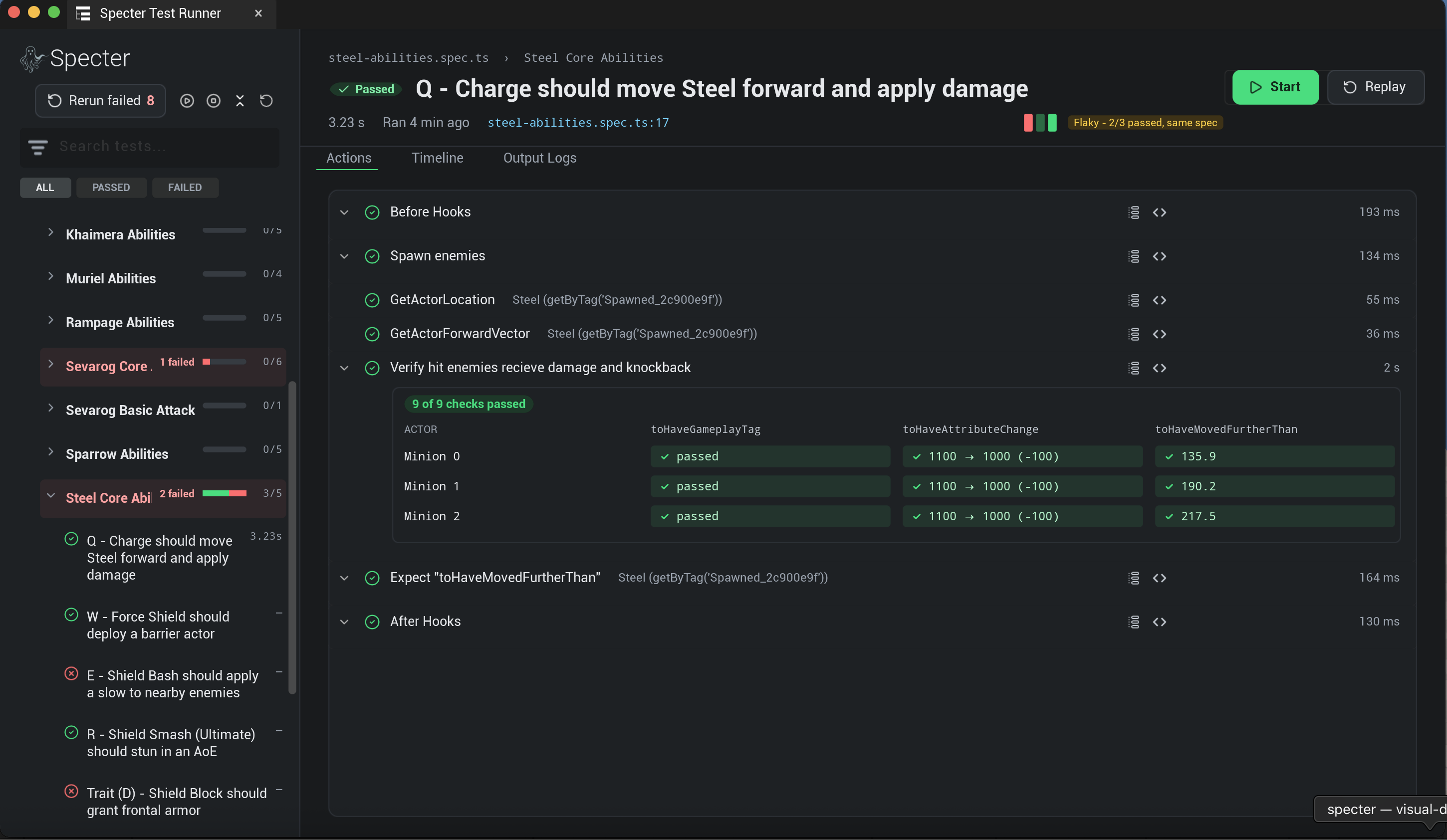
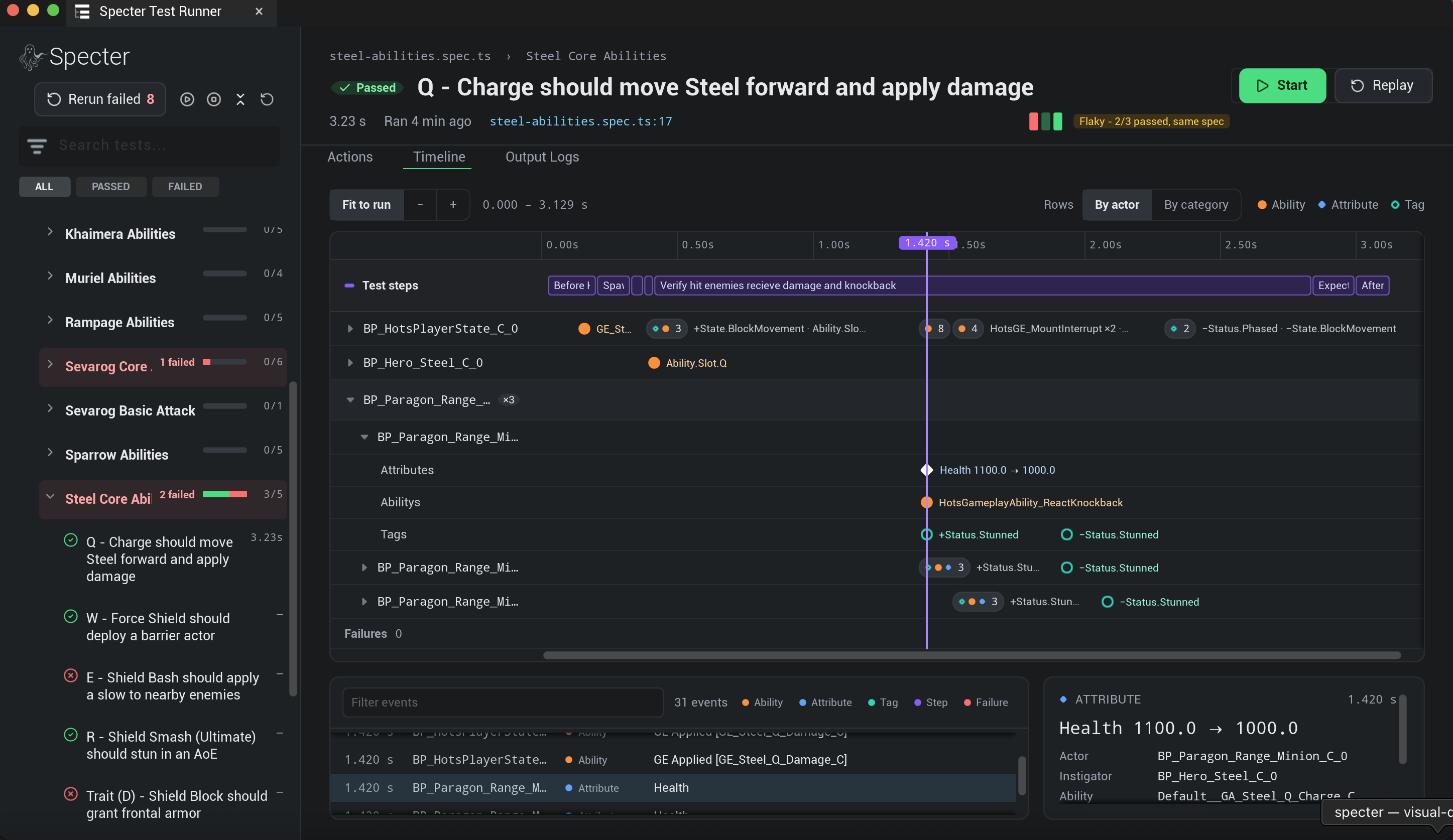
In-Engine Trace Viewer & Test Explorer
No context switching. Specter parses your Playwright suite directly inside an Unreal Editor Utility Widget with real-time test execution controls and live step telemetry.
Native Test Tree Explorer
Parses Playwright test files directly into an in-editor TreeView with live pass/fail/running status badges and instant rerun triggers.
One-Click VS Code Navigation
Click any failing test node or assertion step inside the Unreal Editor to jump directly to the exact file and line number in VS Code.
Live Telemetry & Step Streamer
Watch Playwright steps execute frame-by-frame in real-time with green/red status indicators and live console log streaming inside PIE.
Tracked Variable Timeline
Inspect historical property changes, GAS attribute fluctuations, and gameplay tag updates on a visual, test-synchronized timeline.
Playwright-Native API & Engine-Aware Assertions
Games are asynchronous environments. Specter introduces engine-aware auto-retrying assertions that listen to state events and eliminate brittle manual delays.
Auto-Retrying Matchers
expect(actor).toHavePropertyValue('Health', 0) and expect(actor).toBeVisible() poll/listen to engine ticks until conditions pass.
Playwright HTML Reports
Captures automated viewport screenshots, console logs, and action steps directly into standard Playwright HTML test reports for CI/CD.
import { test, expect } from '@specter-automation/test';

test('Boss health drops on impact', async ({ world }) => {
  const boss = world.actor('BP_Boss_C');

  // Triggers damage event
  await world.actor('BP_Player').pressKey('SpaceBar');

  // Engine-Aware Assertion: Auto-retries until condition is met
  await expect(boss).toHavePropertyValue('Health', 0, {
    operator: '<=',
    timeout: 5000
  });

  // Asserts UMG visibility
  await expect(world.widget('WBP_VictoryScreen')).toBeVisible();
});import { test, expect } from '@specter-automation/test';
test('Event-driven synchronization', async ({ world }) => {
// Tell Specter to monitor 'MatchState' variable
const gameState = world.actor('GameStateBase');
await gameState.trackProperty('MatchState');
// Trigger state change via UMG widget click
// (Auto-waits for the widget to be interactable!)
const menu = world.widget('WBP_MainMenu');
await menu.getByRole('button', { name: 'Start Match' }).click();
// Test pauses until Unreal pushes the state change event
await world.waitForVariable('MatchState', 'InProgress');
await expect(world.actor('BP_EnemySpawner')).toBeVisible();
});Event-Driven Telemetry & UMG Auto-Waiting
Say goodbye to flaky setTimeout and CPU-heavy polling loops. Specter uses a push-based WebSocket architecture that instantly resumes your test the millisecond a variable changes in the Unreal Game Thread.
Instant Event Resolution
waitForVariable('MatchState', 'InProgress') pauses execution until the engine pushes a state change event, ensuring zero-latency test progression.
Playwright UMG Auto-Waiting
Just like the web, UI actions like locator.click() automatically wait for your native UMG widgets to be visible, enabled, and ready for interaction.
Game Object Model (GOM) & Fixtures
Encapsulate complex game logic into reusable, type-safe Page Object Models. Specter's fixture system allows you to inject custom actors and state managers directly into your tests.
HeroPawn or InventorySystem into classes that abstract away underlying locators.test.extend() to provide ready-to-use instances of your models directly into the test arguments (e.g., ({ hero }) =>).import { test, expect } from './fixtures';
// 'hero' and 'boss' are GOM fixtures injected into the test
test('Hero defeats boss', async ({ hero, boss }) => {
// Logic is abstracted away into the model
await hero.equipWeapon('PlasmaRifle');
await boss.waitForPhase('Enraged');
// Perform complex action sequences
await hero.castUltimate();
// Assert against the underlying engine state
await expect(boss.locator).toHavePropertyValue('Health', 0);
await expect(boss.locator).toHaveGameplayTag('State.Dead');
});Smart Selectors & Query Pipeline
Locate 3D Actors and UMG Widgets effortlessly across complex levels using class names, tags, components, and spatial proximity.
Smart Selector Strategies
- world.actor('BP_Enemy_C')Locates actors by Blueprint or C++ class basename.
- world.actor('Tag:Enemy.Boss')Queries actors by Gameplay Tags or native Unreal Tags.
- .getByComponent('AbilitySystem')Narrows down locators by attached UActorComponent types.
- .withinRadius(1000, origin)Filters matching targets by 3D spatial distance.
Fluent Chaining & Indexing
- .first() / .last() / .nth(i)Selects specific zero-indexed instances from queried sets.
- .all()Resolves matching query sets to an array of locators for
for...ofloop iteration. - .or() / .and()Combines multiple locator queries into logical union or intersection sets.
Analog Input & Procedural Sequence Engine
Bypass coarse digital keystrokes. Specter handles complex peripheral simulation, joystick sweeps, and precise combat combos by letting you stream 60 FPS analog thumbstick vectors, 2D/3D Action Vectors, and parametric mathematical curves directly to Unreal Engine 5's Enhanced Input Actions (UInputAction / IA_Move) and native input subsystems.
IA_Move) or custom parametric mathematical curves (addParametricCurve) with frame-accurate timing.SpecterInputSequence to generate 60 FPS joystick circles (addAxisCircle), parametric sweeps, and fighting game combos(⬇️↘️➡️+👊).down(), up(), duration-based pressKey('E', 2000), and analog trigger sweeps.import { test, expect, SpecterInputSequence } from '@specter-automation/test';
test('Simultaneous parametric movement curves on 3 clients', async ({ world, client2, client3 }) => {
const p1 = world.actor(GameAssets.Characters.Marshmallow).isLocallyControlled();
const p2 = client2.actor(GameAssets.Characters.Marshmallow).isLocallyControlled();
const p3 = client3.actor(GameAssets.Characters.Marshmallow).isLocallyControlled();
// Pattern 1: True Dual-Loop Figure-Eight
const fig8Seq = new SpecterInputSequence().addParametricCurve((progress) => {
const currentProgress = (progress * 2) % 1.0;
const theta = (currentProgress / 0.5) * Math.PI * 2;
return {
actions: {
IA_Move: {
x: currentProgress < 0.5 ? Math.sin(theta) : -Math.sin(theta),
y: Math.cos(theta)
}
}
};
}, 0, 4000, 30);
// Pattern 2: Smooth Zig-Zag Wave
const zigZagSeq = new SpecterInputSequence().addParametricCurve((progress) => {
const currentProgress = (progress * 2) % 1.0;
return {
actions: {
IA_Move: {
x: Math.cos(currentProgress * Math.PI * 16) * 1.25,
y: Math.sin(currentProgress * Math.PI * 2)
}
}
};
}, 0, 4000, 30);
// Pattern 3: Straight Back and Forth
const backAndForthSeq = new SpecterInputSequence().addParametricCurve((progress) => {
const currentProgress = (progress * 2) % 1.0;
return { actions: { IA_Move: { x: 0.0, y: Math.sin(currentProgress * Math.PI * 2) } } };
}, 0, 4000, 30);
// Play all 3 sequences SIMULTANEOUSLY across 3 clients
await Promise.all([
p1.playSequence(fig8Seq),
p2.playSequence(zigZagSeq),
p3.playSequence(backAndForthSeq)
]);
});Gameplay Systems & GAS Integration
Built specifically for Unreal Engine. Specter integrates directly into GAS, AI Behavior Trees, and Animation Skeleton Montages out of the box.
Gameplay Ability System
Trigger abilities directly by Gameplay Tag (triggerAbilityByTag), inspect active tags (toHaveGameplayTag), check Gameplay Effects, and assert attribute sets.
AI & Behavior Trees
Inspect AI Controllers, assert Blackboard values (toHaveBlackboardValue), evaluate StateTrees, and verify line-of-sight checks (hasLineOfSightTo).
Skeleton & Montages
Verify AnimMontage playback states (isPlayingMontage), active animation sections, and listen for AnimNotifies during combat execution.
Camera & FOV
Assert active camera shakes playing on the PlayerCameraManager (toBeCameraShaking) and verify FOV transitions (toHaveCameraFOV).
Team Interfaces
Query the IGenericTeamAgentInterface to verify team alignments and assert attitudes like getTeamAttitudeTowards(enemy) === 'Hostile'.
Native UI Widgets
Interact with native UMG UserWidgets just like the DOM. Locator actions like .click() automatically wait for widgets to become interactable.
import { test, expect } from '@specter-automation/test';

test('Hero casts ultimate and triggers AI flee state', async ({ world }) => {
  const hero = world.actor('BP_Hero_Steel');
  const enemyAI = world.actor('BP_Enemy_AI');

  // Trigger GAS Ability by Gameplay Tag
  await hero.triggerAbilityByTag('Ability.Hero.Ultimate');

  // Assert Gameplay Tag presence & Blackboard state
  await expect(hero).toHaveGameplayTag('State.Casting');
  await expect(enemyAI).toHaveBlackboardValue('BehaviorState', 'Flee');

  // Assert AnimMontage playback section
  await expect(hero).isPlayingMontage('AM_Steel_Slam', { section: 'Impact' });
});Multiplayer & Network Emulation
Test Dedicated Servers and multiple client viewports simultaneously inside a single Playwright script. Specter makes multiplayer replication testing painless.
actor.possessAsPlayer(client.world).toHaveMaterialScalarParameter).setEmulatedLatency(150).import { test, expect } from '@specter-automation/test';
test("Verify GAS health and Material Percent parameter update between client and server", async ({
server,
client,
}) => {
// ... [Setup Collapsed: Spawn Steel & Howitzer, possess player on client, assert 100% baseline HP & widget material]
// 3. Trigger single-shot basic attack and verify damage & health bar replication
const damageToDo = await howitzerActor.getAttributeValue("CombatSet", "BaseDamage");
await Promise.all([
// 1. Verify server authority health drops by damageToDo
expect(steelActor).toHaveAttributeValue("HealthSet", "Health", maxHp - damageToDo),
// 2. Verify client replicated health matches
expect(steelActor.client(client.world)).toHaveAttributeValue("HealthSet", "Health", maxHp - damageToDo),
// 3. Verify server health bar widget's dynamic material scalar parameter 'Percent' updated
expect(healthBarWidget).toHaveMaterialScalarParameter(
"Percent",
(maxHp - damageToDo) / maxHp,
{ tolerance: 0.05 }
),
// 4. Verify client health bar widget's dynamic material scalar parameter 'Percent' updated
expect(clientHealthBarWidget).toHaveMaterialScalarParameter(
"Percent",
(maxHp - damageToDo) / maxHp,
{ tolerance: 0.05 }
),
// 5. Trigger single-shot basic attack against Steel from client viewport
clientHowitzer.triggerAbilityWithTarget(
server.heroes.howitzer.abilityBasicAttackSingleShot,
steelActor
),
]);
});3D Visual Telemetry & Assertion Overlays
Never guess what an actor is doing in PIE. Calling actor.highlight("Phase 2") renders 3D cyan bounding boxes, state labels, and visual assertion overlays directly inside your level viewport during live test execution.
Ready to Automate Your UE5 Suite?
Book a 1-on-1 technical walkthrough or inquire about our 30-Day Studio Proof of Concept ($2,500).