Locators
Locators are the central building block of Specter's auto-waiting and retry-ability. In a nutshell, a locator represents a way to find 3D game Actors or 2D UMG UI Widgets in Unreal Engine at any moment.
Core Concepts
Unlike raw engine object pointers, a Specter Locator is lazy-evaluated. When you create a locator, Specter does not immediately search the engine memory. Instead, the locator remembers how to find the target object and evaluates it right when an action (e.g. pressKey(), click()) or assertion (e.g. expect()) is performed.
ActorLocator (3D World)
Represents native AActor instances, Pawns, Characters, or Components residing in the Unreal Engine game world.
WidgetLocator (2D UMG UI)
Represents Slate and UMG UUserWidget elements, buttons, text blocks, progress bars, and inventory slots.
The Smart Proxy System (No Black-Box Limits)
A common misconception about out-of-process automation tools is that they suffer from "black-box limitations" — that because your test script lives in Node.js, you lack synchronous access to lower-level C++ pointers or internal memory allocations.
While it's true your TypeScript script isn't doing raw C++ pointer arithmetic (e.g. 0x7ffee234), Specter completely bypasses these limitations using our C++ Smart Proxy System.
When you type world.actor("BP_Player"), Node.js is just holding a string reference. But when you execute an action like await player.callFunction("GetHealth"), the Specter C++ plugin instantly translates that string into the exact, live AActor* pointer in the Unreal Engine memory heap. It executes the logic synchronously on the game thread during the engine tick, and safely passes the result back.
Why this is actually safer than direct pointer access:
- ✓Crash Prevention If a traditional test script holds a raw C++ pointer and the Unreal Garbage Collector destroys that actor, the game will instantly hard-crash (Segfault) the moment the test tries to read it. With Specter's proxy, if an actor is destroyed, the C++ side safely checks
IsValid(Actor)and returns a clean, catchable error to TypeScript instead of crashing the engine. - ✓Infinite Flexibility You aren't limited to a rigid WebSocket transport layer. If a property or function has a
UFUNCTION()orUPROPERTY()tag in Unreal, Specter can dynamically find the pointer via the Reflection system and execute it directly.
Note on Network Dependency: While Specter uses WebSockets to communicate between Node.js and Unreal Engine, both the server and client run on localhost (127.0.0.1) on your machine or CI/CD runner. This means communication is instantaneous and "network hiccups" on a local loopback address are practically non-existent.
Strongly-Typed Blueprints (IntelliSense)
When querying actors or widgets, you don't have to guess class names and wait until runtime to catch typos. Specter features Strongly-Typed Blueprints, providing strict compile-time validation and instant VS Code autocomplete for every Actor, Component, and Widget in your Unreal Engine project.
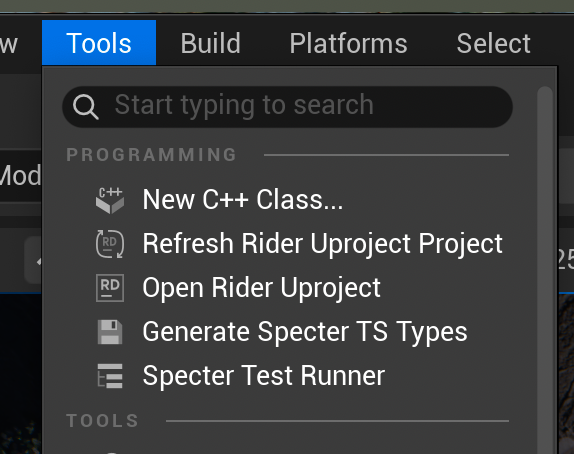
Generating TypeScript Types
- In Unreal Engine, go to the top toolbar and click Tools → Programming → Generate Specter TS Types.
- Specter will scan the Unreal Asset Registry and generate a
specter-types.d.tsfile in your testing directory. - Commit this file to your version control.
Zero-Import Global Augmentation
There are absolutely no extra imports needed in your test files. The generated types use TypeScript module augmentation to globally inject directly into the @specter-automation/test package.
Once generated, methods like world.actor(), world.widget(), and locator.getByComponent() will instantly provide a dropdown of valid classes. If a Blueprint is renamed or deleted in Unreal, your TypeScript tests will fail to compile, preventing brittle tests and catching breakages before you even run them.
Actor Locators (3D World)
Querying actors in 3D space supports multiple strategies—from Blueprint class basenames to Gameplay Tags and controller ownership filters:
// 1. Class Name Selector (Default)
const player = world.actor('BP_Hero_Steel');

// 2. Tag Prefix Selector (Playwright-style)
const boss = world.actor('Tag:Enemy.Boss');
const bossAlt = world.actor('tag=Enemy.Boss');

// 3. Explicit Tag Method
const bossExplicit = world.actorByTag('Enemy.Boss');

// 4. Narrow down to human player vs AI bots
const localPlayer = world.actor('BP_Hero_Shooter').isLocallyControlled(true);

// 5. Access specific components on an actor
const movement = player.getByComponent('CharacterMovementComponent');
Widget Locators (2D UMG UI)
Locating UI elements is straightforward using UMG widget names, hierarchy child getters, or text matching:
const modal = world.widget('WBP_ConfirmModal');

// 1. Fetch widget text into a variable using .getText()
const text = await modal.getChild('TitleText').getText();
expect(text).toBe('Are you sure?');

// 2. Or use Auto-Retrying Matchers (auto-polls engine ticks for up to 5s)
await expect(modal.getChild('TitleText')).toHaveText('Are you sure?');
await expect(modal.getChild('SubtitleText')).toContainText('cannot be undone');

// 3. Assert input fields & interactive state
await expect(modal.getChild('UsernameInput')).toHaveValue('Player1');
await expect(modal).toBeVisible();
await expect(modal.getChild('ConfirmButton')).toBeEnabled();

// 4. Custom timeout & negation
await expect(modal.getChild('TitleText')).toHaveText('Success!', { timeout: 10000 });
await expect(modal).not.toBeVisible();
Actor-Scoped Widget Locators
Actors frequently host widgets in the 3D world via UWidgetComponent (Screen Space or World Space), such as floating overhead health bars, nameplates, damage numbers, and interaction prompts.
Previously, searching for a widget using world.widget() performed a global world search across all widgets in memory. This made targeting a specific unit's overhead widget difficult when multiple units shared the same widget class. Specter now supports Actor-Scoped Widget Locators, enabling locators to cleanly transition from an ActorLocator directly to a WidgetLocator.
// 1. Target the floating health bar widget directly from a specific hero or minion:
const steel = await world.actor('BP_Hero_Steel');

// Grabs the widget from Steel's UWidgetComponent:
const healthBar = steel.widget();
await expect(healthBar).toBeVisible();

// 2. Filter by specific widget class name if an actor has multiple widget components:
const specificBar = steel.widget("Minion_HealthBar");

// 3. Target by the Unreal UWidgetComponent name:
const compBar = steel.widgetComponent("HealthBarComponent");

// 4. Find child elements (e.g. dynamic health fill image) directly on the actor:
const healthImage = steel.getByRole("image", { name: "HealthBarImage", exact: false });
await expect(healthImage).toBeVisible();
Filtering & Collections
When multiple actors match a query, you can filter and iterate over collections easily:
// Select multiple matching actors
const minions = world.actor('BP_Minion');

// Pick the first, last, or specific index (0-indexed)
const leaderMinion = minions.first();
const trailingMinion = minions.last();
const thirdMinion = minions.nth(2);

// Iterate over all matching locators using for...of
for (const minion of await minions.all()) {
  await expect(minion).toHavePropertyValue('IsActive', true);
}