In-Engine Trace Viewer & Portable Traces
“The Playwright Trace Viewer for Unreal Engine.” Debug tests natively inside Unreal Editor. Inspect variable timelines, replay actions, and debug CI test failures using self-contained .specter-trace.json artifacts without ever having to manually reproduce bugs locally.
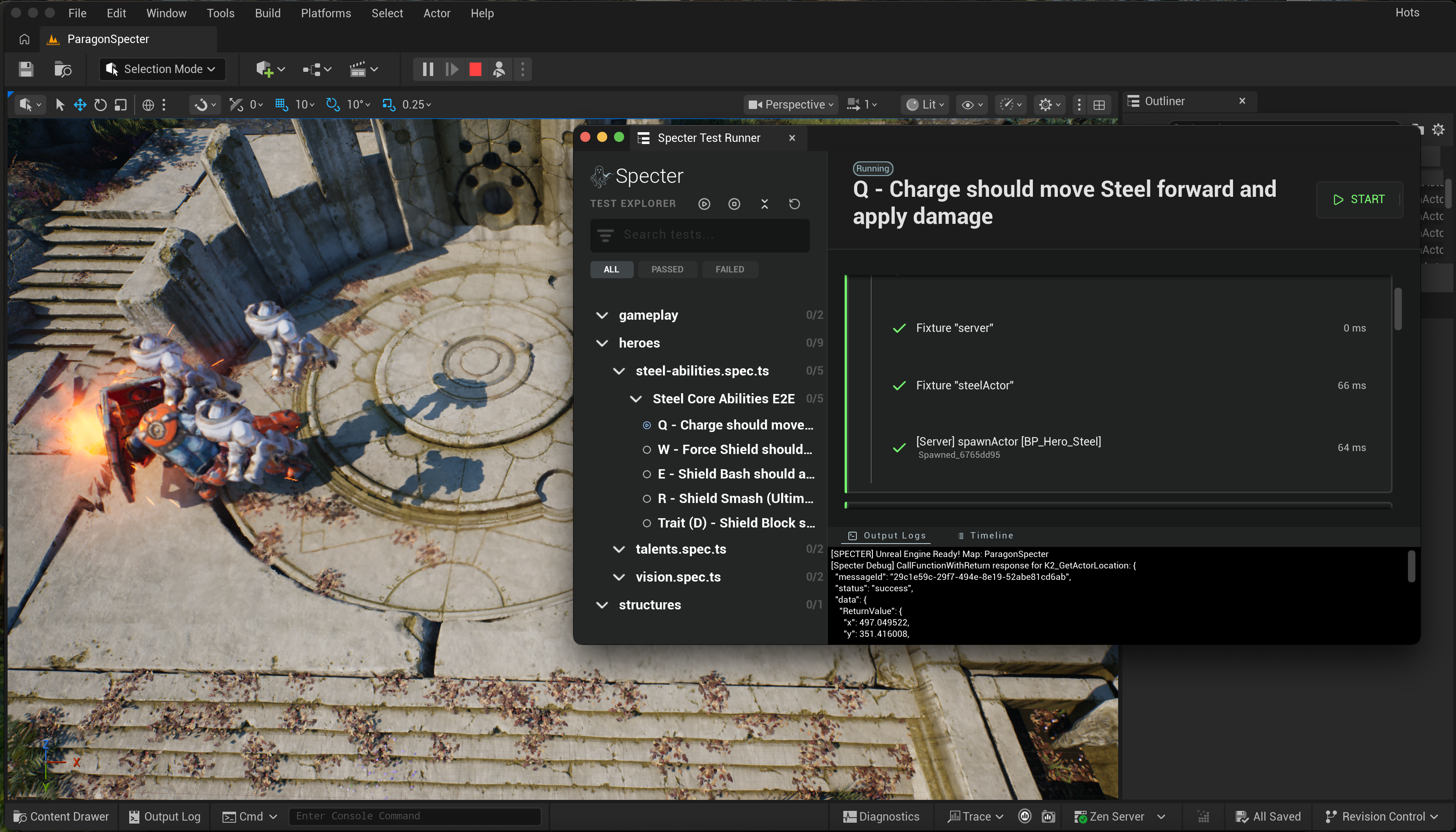
Unlike traditional web automation where trace viewers run in a separate browser tab, Specter integrates directly into the Unreal Editor via an Editor Utility Widget. This allows you to inspect variable timelines, replay actions, and debug failed assertions without ever leaving the engine.
Portable CI Traces (.specter-trace.json)
“Failed on CI” no longer means “now spend hours reproducing it locally.”
When a gameplay test fails on CI overnight, studios usually get an HTML log and have to spend hours trying to reproduce the failure on developer workstations. With Specter, every failing test automatically produces a single, self-contained .specter-trace.json artifact containing:
- Full Execution Timeline: Microsecond-accurate step timing and state changes.
- Native GAS Telemetry: Ability activations, applied gameplay effects, attribute deltas, and active tags.
- Console & Subsystem Logs: Synchronized Unreal Engine
UE_LOGstream. - Embedded Screenshots: Base64 viewport captures taken at the exact microsecond of failure.
Enabling Traces in Playwright Config
Configure trace capture in playwright.config.ts or toggle globally via SPECTER_TRACE=on:
// playwright.config.ts
import { defineConfig } from "@playwright/test";
import type { SpecterTestOptions } from "@specter-automation/test";

export default defineConfig<SpecterTestOptions>({
  use: {
    // Collect portable traces on failure or retry (or set SPECTER_TRACE=always)
    trace: "on-first-retry",
  },
});
Inspecting CI Traces in the Editor
When a test fails on CI, download the generated .specter-trace.json artifact. Anyone on your team—engineers, gameplay designers, or QA—can inspect and debug the failure directly inside Unreal Engine:
Drag-and-Drop Trace Loading
Simply drag and drop the .specter-trace.json file directly onto the Specter Runner Widget window in Unreal Editor (or click Open Trace in the widget header).
- Instant Timeline Reconstruction: Automatically rebuilds the Action Tree, step statuses, and timing markers.
- Native GAS State Inspection: Interactively inspect attribute values, active gameplay effects, and tags captured at each step.
- Embedded Viewport Screenshot: Instantly displays the rendered frame and error stack trace captured at the exact microsecond of failure.
How to Open
Launch the Trace Viewer directly from the Unreal Editor menu.
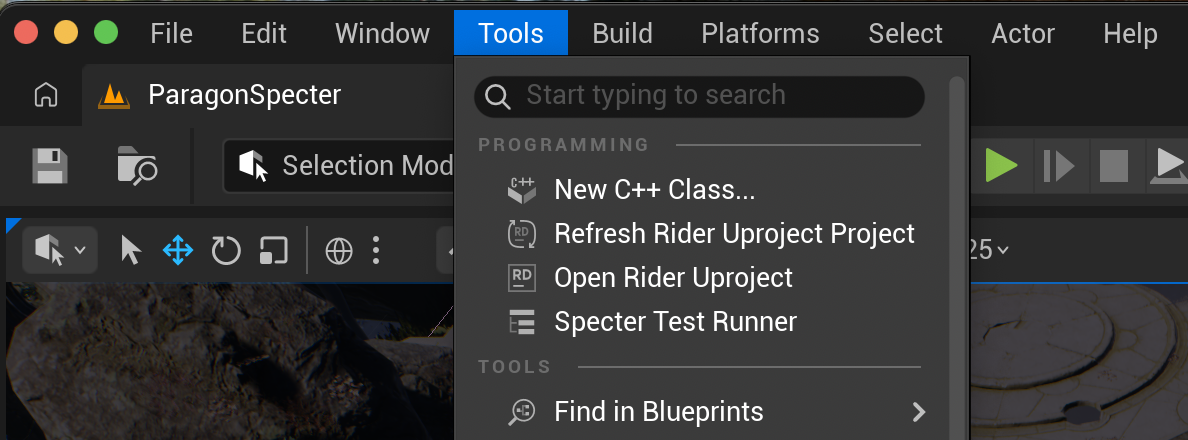
You don't need to hunt down Blueprints or Editor Utility Widgets in your content browser. Specter automatically registers the widget in the main Editor toolbar. Simply open the Tools dropdown menu at the top of the editor and select Specter Test Runner to open the dockable window.
The Action Tree
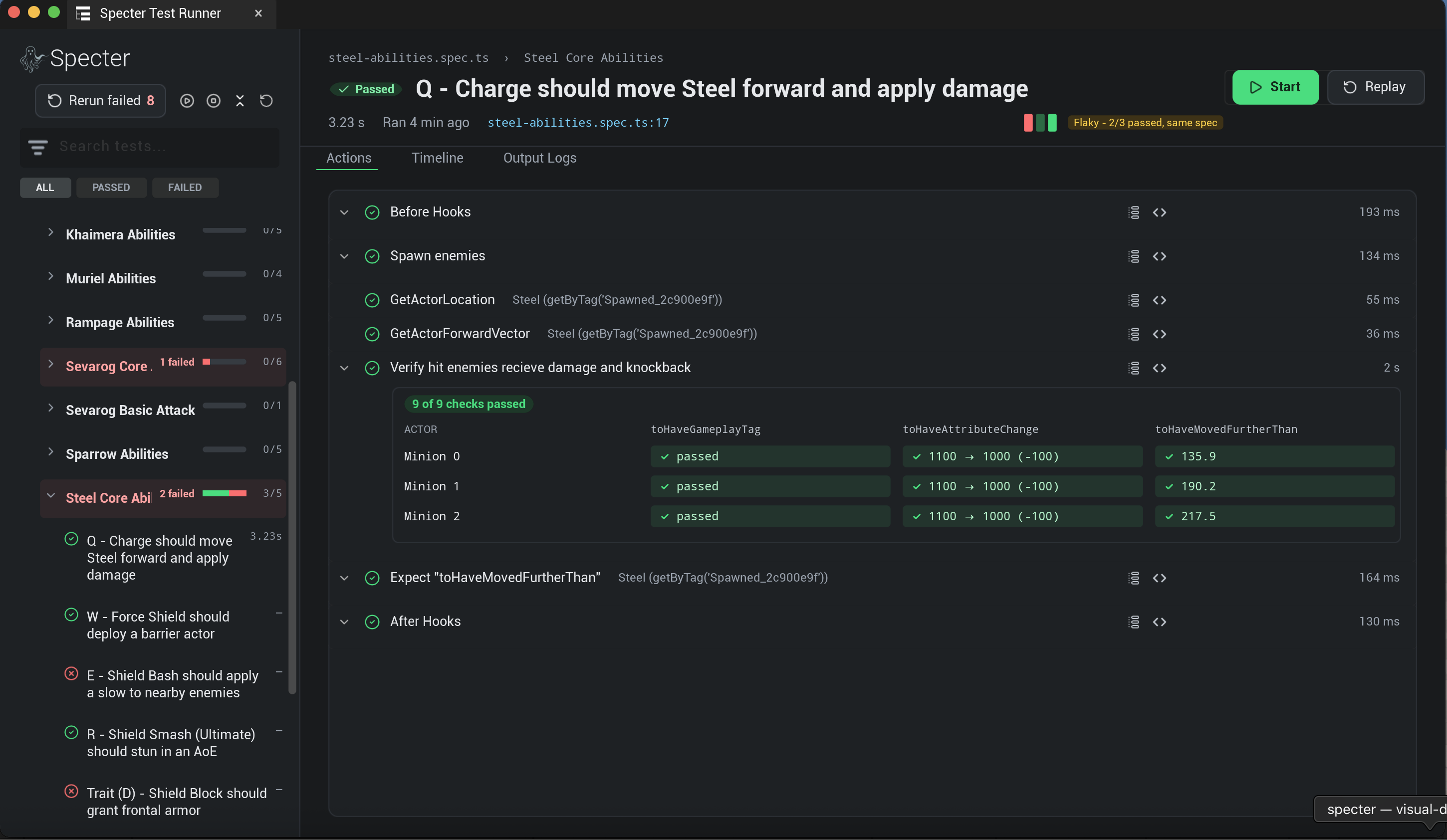
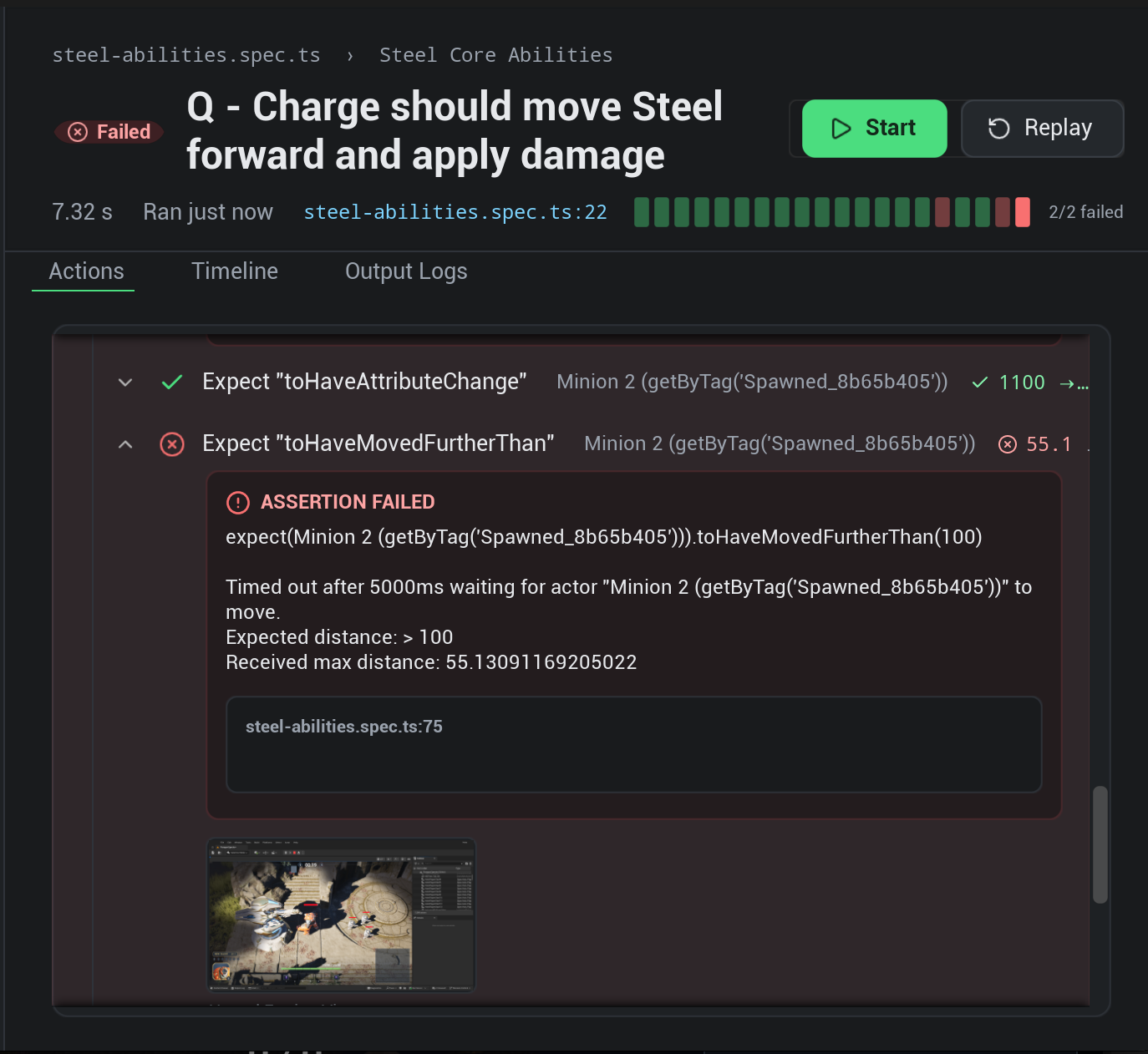
The Action Tree provides a hierarchical breakdown of your Playwright test execution.
Every action, locator query, and assertion from your test script is captured and parsed into the tree. Green checkmarks indicate successful steps, while red indicators highlight exactly where and why a test failed. Clicking on any step in the Action Tree immediately scrubs the Timeline to that exact moment in the test execution.
Timeline & Telemetry
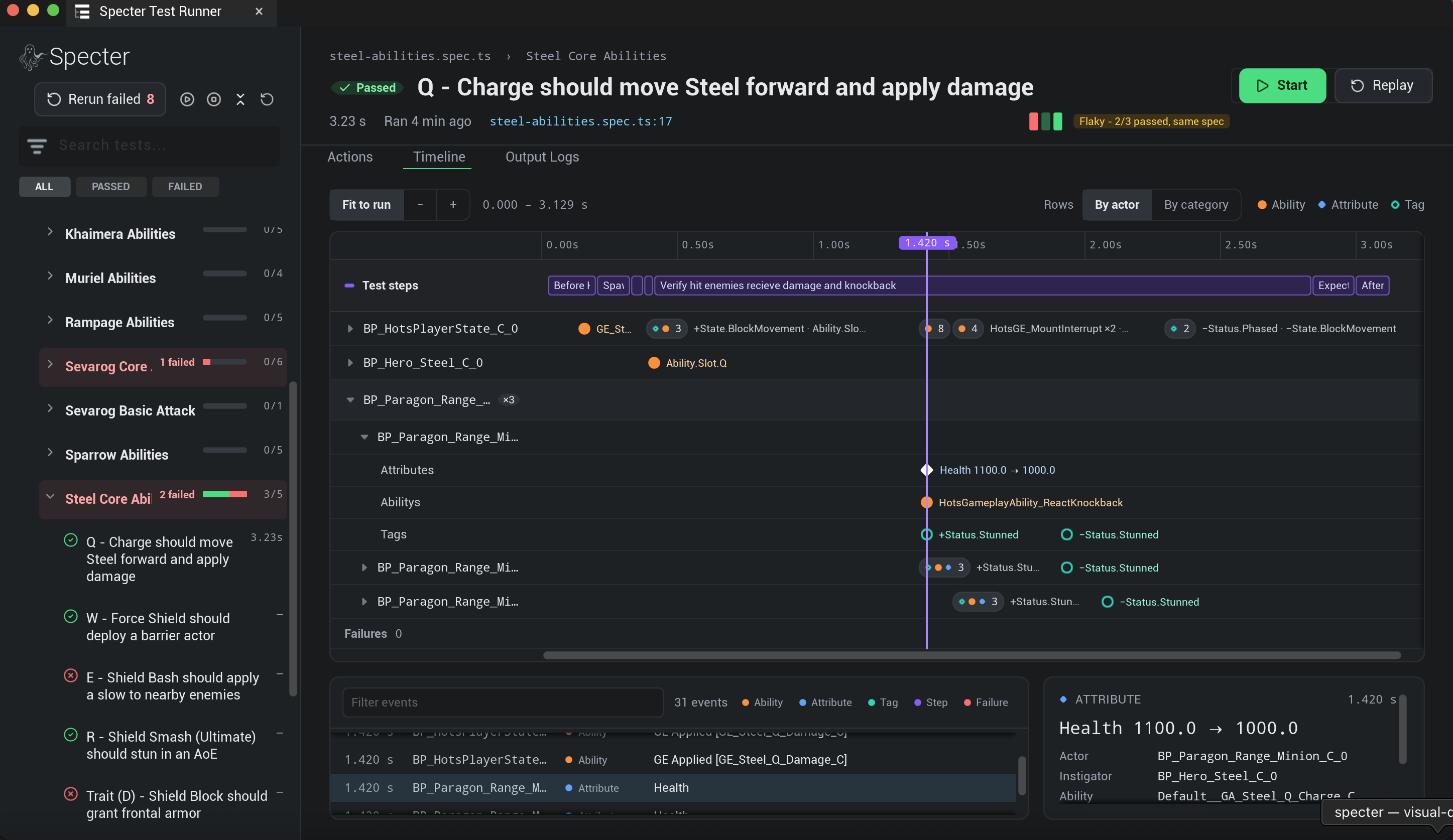
Correlate engine telemetry with your test execution timeline.
The Timeline view aligns engine telemetry and tracked variables with the exact execution time of your Playwright steps. It graphs tracked variables, gameplay tags, and performance metrics, allowing you to visually diagnose why an assertion failed or why an AI behaved unexpectedly at a specific timestamp.
Error Handling & Stack Traces
Instant context for test failures.
When a test fails, the Trace Viewer pulls the error message, the expected vs. actual values, and the full Playwright stack trace directly into the Unreal Editor widget. You can even click the stack trace to jump straight to the offending line of code in VS Code.
Multi-Assertion Matrix (expectAll())
NewVisualize multi-actor combat outcomes across an entire 2D matrix of conditions.
When testing multi-target combat abilities (like AoE explosions, crowd control slams, or chain-lightning), traditional assertions stop at the first broken condition and fail the test immediately. This leaves you blind to what happened to every other target or downstream attribute.
With expectAll(), Specter evaluates all assertions concurrently against a synchronized game snapshot and renders a 2D Multi-Assertion Matrix directly inside the In-Engine Trace Viewer:
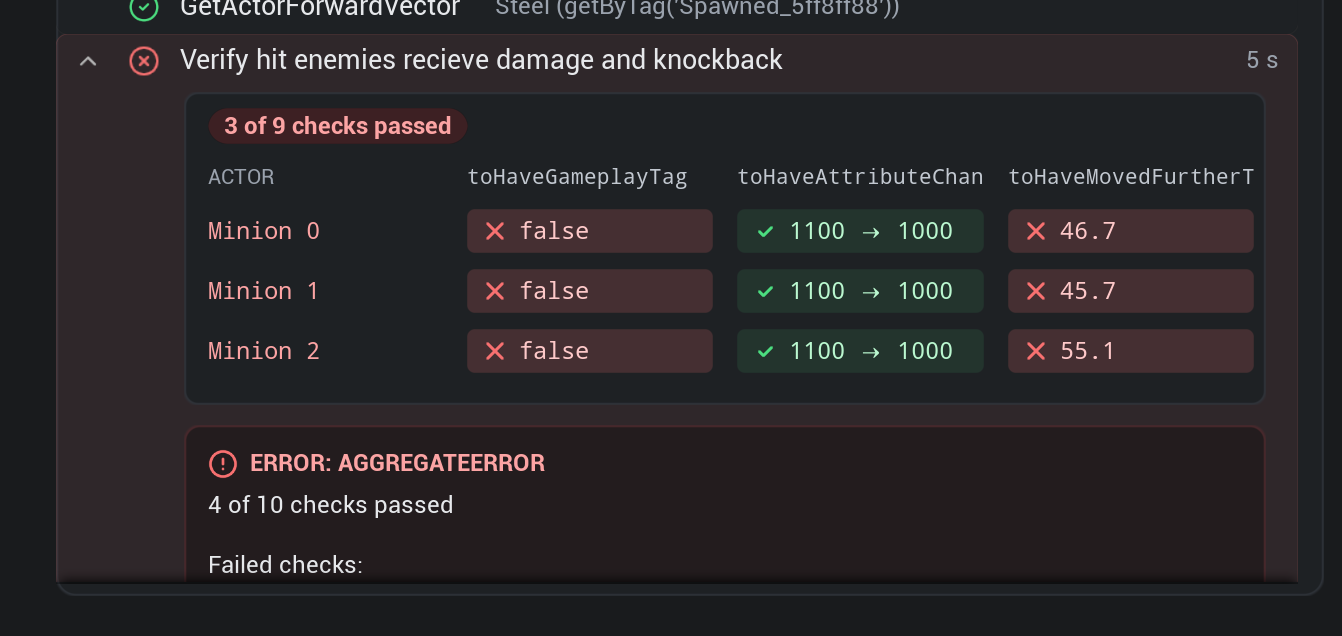
Maps actors on the Y-axis against assertions on the X-axis, giving you full visibility into which enemies reacted properly and which ones resisted effects.
Each cell displays exact evaluated values: green badges show successful transitions (✓ 1100 → 1000), while red badges highlight exact received values (❌ false, ❌ 46.7cm).
Highlights overall pass rates (e.g., 3 of 9 checks passed) and provides an AggregateError breakdown with precise indices for every failing check.
Example: AoE Shield Slam Verification
The test below executes the exact multi-minion verification scenario shown in the matrix above:
import { test, expect, expectAll } from "@specter-automation/test";

test("Verify hit enemies receive damage and knockback", async ({ world, steelActor, minion0, minion1, minion2 }) => {
  const startPos0 = await minion0.getLocation();
  const startPos1 = await minion1.getLocation();
  const startPos2 = await minion2.getLocation();

  // Steel executes AoE Shield Slam
  await steelActor.triggerAbility("Ability.Slot.R");

  // Atomic verification across multiple minions with live Matrix visualization in Trace Viewer
  await expectAll([
    // 1. Damage checks (passed: 1100 -> 1000)
    expect(minion0).toHaveAttributeChange("HealthSet", "Health", { delta: -100 }),
    expect(minion1).toHaveAttributeChange("HealthSet", "Health", { delta: -100 }),
    expect(minion2).toHaveAttributeChange("HealthSet", "Health", { delta: -100 }),

    // 2. Stun tag checks (failed: false)
    expect(minion0).toHaveGameplayTag("Status.Stunned"),
    expect(minion1).toHaveGameplayTag("Status.Stunned"),
    expect(minion2).toHaveGameplayTag("Status.Stunned"),

    // 3. Knockback distance checks (failed: ~46-55cm vs expected >= 150cm)
    expect(minion0).toHaveMovedFurtherThan(startPos0, 150),
    expect(minion1).toHaveMovedFurtherThan(startPos1, 150),
    expect(minion2).toHaveMovedFurtherThan(startPos2, 150),
  ]);
});