Assertions & Auto-Waiting
Specter includes test assertions built directly on top of Playwright's expect function. Unlike traditional game engine testing where you must manually queue latent commands or sleep(), Specter's matchers automatically retry until the game state meets your conditions.
Auto-Retrying Assertions
When asserting dynamic game state (like waiting for a character to finish an animation, or a projectile to hit a target), the game engine needs time to simulate. Use await expect(locator).to... to tell Specter to auto-retry the condition until it passes or the timeout is reached.
toHaveGameplayTag), binding natively to Unreal Engine delegates for zero-overhead, instant resolution.// ❌ BAD: Manual sleeping is flaky and wastes CI time
await world.waitForTimeout(2000);
const state = await boss.hasGameplayTag('Status.Stunned');
expect(state).toBe(true);
// ✅ GOOD: Auto-retries instantly pass the moment the tag is applied
await expect(boss).toHaveGameplayTag('Status.Stunned');
By default, async matchers will wait up to 5000ms. You can override this globally in your config or per-assertion via { timeout: 10000 }.
Gameplay & State Matchers
Specter exposes specific matchers for querying Unreal Engine's native systems:
| Assertion | Description |
|---|---|
| toHaveLocation() | Waits until the actor reaches a specific 3D coordinate (with optional tolerance). |
| toHaveMovedFurtherThan() | Waits until the actor has moved a specific distance from a starting location. |
| toHaveGameplayTag() | Waits until the actor has a specific tag via IGameplayTagAssetInterface. |
| toHaveAppliedGameplayEffect() | Asserts a Gameplay Effect was applied to the ASC (with optional count, instigator, and debounce). |
| toHaveActiveGameplayEffect() | Event-driven assertion verifying an ongoing Gameplay Effect with optional stack count and effect level. |
| expectAll() | Evaluates multiple assertions concurrently against a synchronized game state snapshot without race conditions. |
| toHaveActivatedAbility() | Asserts an ability activated on the ASC (with optional exact activation count and trigger callback). |
| toBePossessed() | Waits until the pawn is actively possessed by a Controller (Player or AI). |
| toBePlayerControlled() | Waits until the pawn is actively possessed by a human PlayerController. |
| toBeLocallyControlled() | Waits until the pawn is possessed by the local human player. |
| toHaveController() | Waits until the pawn is possessed by a specific controller class. |
| toBeAINavigating() | Waits until the actor's AI Controller is actively moving along a NavMesh path. |
| toHaveTeamId() | Waits until the actor's Generic Team ID matches the expected value. |
| toBeHostileTowards() | Waits until the actor evaluates as hostile towards another given actor. |
| toHaveInputMappingContext() | Waits until the Enhanced Input mapping context is active on the player. |
| toHaveInputActionValue() | Waits until a specific Enhanced Input action evaluates to an expected value. |
| toHavePlayerScore() | Waits until the PlayerState score meets the condition. |
| toBeNiagaraActive() | Waits until the actor's Niagara particle system is actively emitting. |
| toHaveNiagaraAsset() | Waits until the actor is using a specific Niagara system asset. |
| toBeAudioPlaying() | Waits until the actor's Audio Component is playing. |
| toHaveSoundAsset() | Waits until the actor is playing a specific USoundBase asset. |
| toBePhysicsSimulating() | Waits until the actor's rigid body is actively simulating physics. |
| toBePhysicsAsleep() | Waits until the actor's rigid body enters a sleeping state. |
| toHaveVelocity() | Waits until the actor's physics speed meets the condition. |
| toHaveCameraFOV() | Waits until the player's camera reaches a specific Field of View. |
| toBeCameraShaking() | Waits until the player's camera manager has active camera shakes. |
| toHaveCameraViewTarget() | Waits until the camera's active view target is the specified actor. |
⚡ New: Specter GAS Diagnostics & Observability Suite
When a GAS assertion fails, Specter automatically outputs a high-resolution Live GAS Event Causality Timeline in the console and test report. In addition, our engine-level Rapid-Fire Watchdogs continuously monitor active ASCs to detect duplicate triggers and missing DoOnce conditions in real-time.
UI & Widget Matchers
When testing UMG user interfaces, Specter provides DOM-like assertions for native Slate widgets:
| Assertion | Description |
|---|---|
| toBeVisible() | Ensures the widget is rendered (Not Collapsed or Hidden) and within viewport bounds. |
| toBeEnabled() | Ensures the native widget button is interactable (bIsEnabled is true). |
| toHaveText() | Validates the exact or regex matched text inside a UTextBlock or EditableText. |
| toContainText() | Ensures the widget's text contains the given substring. |
| toHaveValue() | Validates the text value of a UEditableText or UEditableTextBox widget. |
Material & Visual Matchers
Specter provides first-class assertions and inspection for Unreal Engine Materials across both 3D Actors/Meshes (Static Mesh, Skeletal Mesh) and 2D UMG Widgets (dynamic materials applied to Images, Borders, or nested in containers).
✓ Automatic Hierarchy Traversal
When a material assertion is called on a container widget (like SizeBox or UserWidget), Specter automatically traverses the child widgets to locate the nested Image or Border with an assigned UMaterialInterface!
| Assertion | Description |
|---|---|
| toHaveMaterialScalarParameter() | Asserts on float/scalar material parameters (e.g. Dissolve, Opacity, Health). |
| toHaveMaterialVectorParameter() | Asserts on vector/color material parameters (e.g. TeamColor, GlowColor). Supports Hex, RGB, or Arrays. |
| toHaveMaterial() | Verifies which material asset (String or RegExp) is assigned to a specific slot. |
| toBeDynamicMaterial() | Asserts the material is a UMaterialInstanceDynamic (MID). |
| toHaveMaterialTextureParameter() | Asserts a specific UTexture asset is bound to a texture parameter (e.g. Player portraits, emblems). |
Example: UMG Material Assertions
import { test, expect } from '@specter-automation/test';

test('Minion health bar updates material percent on damage', async ({ world }) => {
    const healthBar = world.specter.widget('WBP_MinionHealthBar');

    // Automatically inspects the Image nested inside the SizeBox:
    await expect(healthBar.locator('SizeBox_Health')).toHaveMaterialScalarParameter('Percent', 1.0, {
        operator: '==='
    });

    // Or target the Image directly:
    const healthImage = healthBar.locator('Image_Health');
    await expect(healthImage).toBeDynamicMaterial();
    await expect(healthImage).toHaveMaterialVectorParameter('HealthColor', '#00FF00');

    // Simulate damage and poll for scalar change:
    await expect(healthImage).toHaveMaterialScalarParameter('Percent', 0.5, {
        operator: '<=',
        timeout: 3000
    });
});
Pure Event-Driven GAS & expectAll() Atomic Verification
When verifying multi-actor combat exchanges (e.g. AoE damage, status effects, and knockbacks), sequential assertions introduce race conditions if the game state ticks or changes between checks. expectAll() evaluates multiple assertions concurrently and guarantees that all conditions pass atomically against a synchronized game state snapshot.
⚡ Zero-Polling, Native C++ Delegate Binding
GAS matchers like toHaveActiveGameplayEffect and toHaveGameplayTag bind directly to Unreal Engine's native FOnGameplayEffectAppliedDelegate and FOnGameplayAttributeValueChange delegates over WebSockets, guaranteeing instantaneous, event-driven verification with zero polling latency.
import { test, expect, expectAll } from '@specter-automation/test';

test('Atomic multi-actor verification on combo impact', async ({ world, steelActor, howitzerActor }) => {
  await howitzerActor.triggerAbility('Ability.Slot.Q');

  // Pure event-driven, atomic evaluation across multiple actors
  await expectAll([
    expect(steelActor).toHaveAttributeValue('HealthSet', 'Health', 2000),
    expect(steelActor).toHaveActiveGameplayEffect('GE_ShieldBuff', { stacks: 3, level: 1 }),
    expect(howitzerActor).toHaveGameplayTag('Cooldown.Ability.Q'),
  ]);
});
Multi-Assertion Matrix in In-Engine Trace Viewer
Unlike traditional assertions that fail on the very first broken condition and hide what happened to the other actors, Specter captures the entire multi-assertion batch and renders an interactive 2D Results Matrix Grid directly in Unreal Editor.
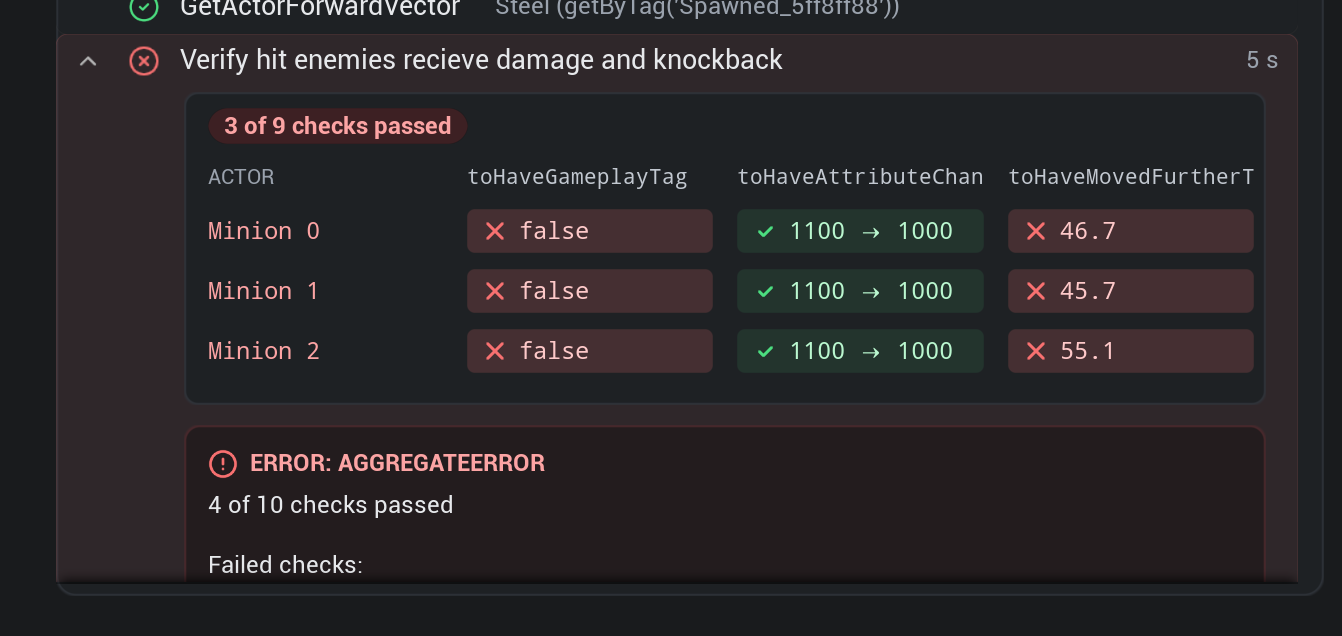
The matrix maps target actors along the Y-axis against assertions on the X-axis, displaying real-time cell diffs (e.g. ✓ 1100 → 1000 or ❌ 46.7cm) and an AggregateError breakdown. Learn more in the In-Engine Trace Viewer Multi-Assertion Matrix documentation.
Visual Assertions (toMatchScreenshot)
Logic assertions alone can't tell you if a character mesh is T-posing, a ground crack particle effect failed to spawn, or a material shader is rendering magenta. Specter integrates directly with Playwright's snapshot engine (__snapshots__) to capture rendered frames from Unreal Engine's active viewport and verify them against golden reference images.
| Option | Type | Description |
|---|---|---|
| threshold | number | Perceptual color difference threshold between 0 (strict) and 1 (lenient). Default: 0.2. |
| maxDiffPixelRatio | number | Acceptable ratio of differing pixels between 0 and 1 (e.g. 0.02 for 2%). |
| showUI | boolean | Whether to include Slate/UMG UI overlays in the captured frame. Default: false. |
| timeout | number | Retries frame capture until the visual stabilizes within the allowed difference. |
import { test, expect } from '@specter-automation/test';

test('Shield Slam ground fracture matches visual reference', async ({ world, steelActor }) => {
  await steelActor.triggerAbilityWithTarget('Ability.Slot.R', { x: 500, y: 0, z: 0 });

  // Wait for the impact visual and assert against golden snapshot
  await expect(world).toMatchScreenshot('steel_shield_slam_impact.png', {
    threshold: 0.15,           // 15% color perception threshold
    maxDiffPixelRatio: 0.02,   // Allow up to 2% differing pixels
    showUI: false,             // Ignore HUD/UMG overlays
    timeout: 2000,             // Retries until visual stabilizes
  });
});
Performance Budget Assertions (FPS & Memory Guardrails)
A newly added Niagara particle system or complex ability script might pass functional tests while tanking frame rate from 60 FPS to 15 FPS. Specter lets you enforce performance budgets in CI with granular assertions for minimum FPS, maximum frame time spikes, and memory ceilings.
| Assertion | Description |
|---|---|
| toMaintainPerformanceBudget() | Enforces continuous minFps, maxFrameTimeMs, and maxMemoryMb over a sampling window. |
| toHaveFPS() | Polls until engine frame rate satisfies the comparison threshold (e.g. >= 60). |
| toHaveFrameTimeBelow() | Asserts frame delta time stays below a millisecond spike ceiling (e.g. 16.6ms). |
import { test, expect } from '@specter-automation/test';

test('Ultimate ability respects 60 FPS performance budget', async ({ world, steelActor }) => {
  await steelActor.triggerAbility('Ability.Slot.R');

  // Enforce continuous performance budget across a 5-second sample window
  await expect(world).toMaintainPerformanceBudget({
    minFps: 60,
    maxFrameTimeMs: 16.6,
    maxMemoryMb: 4096,
    sampleDurationSec: 5.0,
  });

  // Granular assertions for frame spikes & frame rate ceilings
  await expect(world).toHaveFPS(60, { operator: '>=' });
  await expect(world).toHaveFrameTimeBelow(16.6);
});
Generic Playwright Matchers
Because Specter is built on top of Playwright's test runner, you have full access to all standard Playwright matchers for checking simple JavaScript values, primitives, and objects. For the complete list of built-in runner matchers, check out the official Playwright Assertions documentation:
| Assertion | Description |
|---|---|
| toBe(value) | Asserts strict equality (e.g. expect(health).toBe(100)). |
| toEqual(value) | Asserts deep equality for objects and arrays. |
| toBeTruthy() | Asserts the value is truthy. |
| toBeGreaterThan() | Asserts the value is numerically greater than the target. |
| toContain() | Asserts an array contains an item, or a string contains a substring. |
Negating Matchers
You can invert any async matcher by adding .not. It will automatically wait until the condition is false.
// Wait until the Loading Screen widget is removed or collapsed
await expect(loadingScreen).not.toBeVisible();

// Wait until the debuff wears off
await expect(player).not.toHaveGameplayTag('Status.Stunned');