Running Tests
Because Specter is built on top of Playwright, you can run your tests using the standard Playwright CLI, Playwright's interactive UI mode, or directly inside the Unreal Editor using the Specter Test Runner.
Command Line (CLI)
The fastest way to run your entire suite, perfect for CI/CD pipelines.
Running tests via the CLI will automatically connect to your running Unreal Editor PIE session (or launch a standalone game instance depending on your configuration).
npx playwright testPlaywright UI Mode
Interactive test explorer with action steps and logs.
Playwright's UI mode provides a visual interface to explore, run, and debug tests. You can view console logs, inspect action steps, and execute specific files.
npx playwright test --uiIn-Engine Specter Test Runner
Zero context switching. Run tests directly from Unreal Engine.
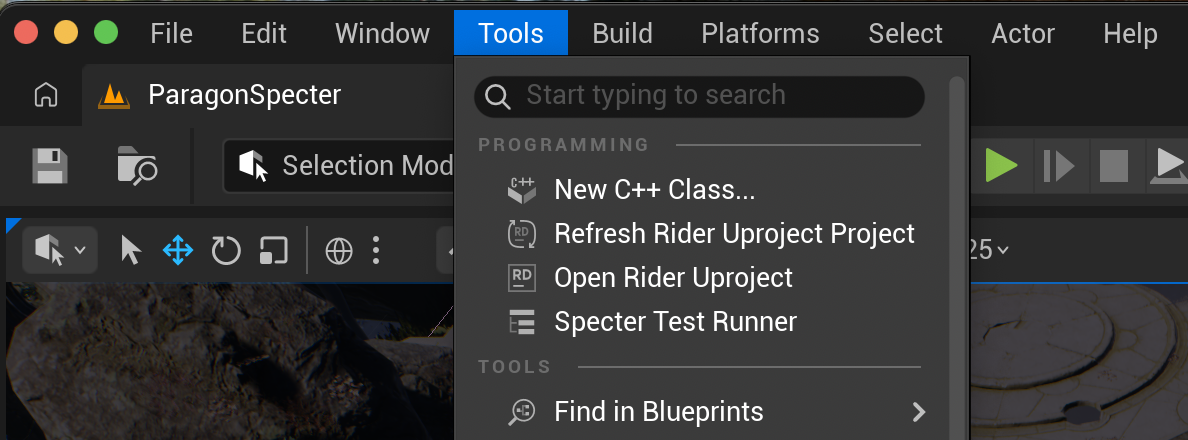
Specter registers an Editor Utility Widget in Unreal Engine that acts as a native test explorer. Open the Tools dropdown menu at the top of the editor and select Specter Test Runner to open it.
From here, you can click the "Play" button next to any test to run it natively. The widget doubles as a Trace Viewer, allowing you to instantly scrub through the timeline of a failed test without ever leaving the engine.